Do you want smoother and faster payments when playing online casinos in the Philippines?
Transferring GCash to PayMaya can seem tricky at first, and some users worry about security.
In this guide, we break down the process into simple steps, share important precautions, and show you how to send GCash to PayMaya safely.
Follow this guide and enjoy hassle-free online casino play without delays or complications.
【Complete Guide】How to Transfer GCash to PayMaya Safely and Quickly
We’ll clearly explain the steps to move funds from GCash to Maya, complete with illustrations.
Let’s walk through it together using actual screenshots.
1. Open the GCash app
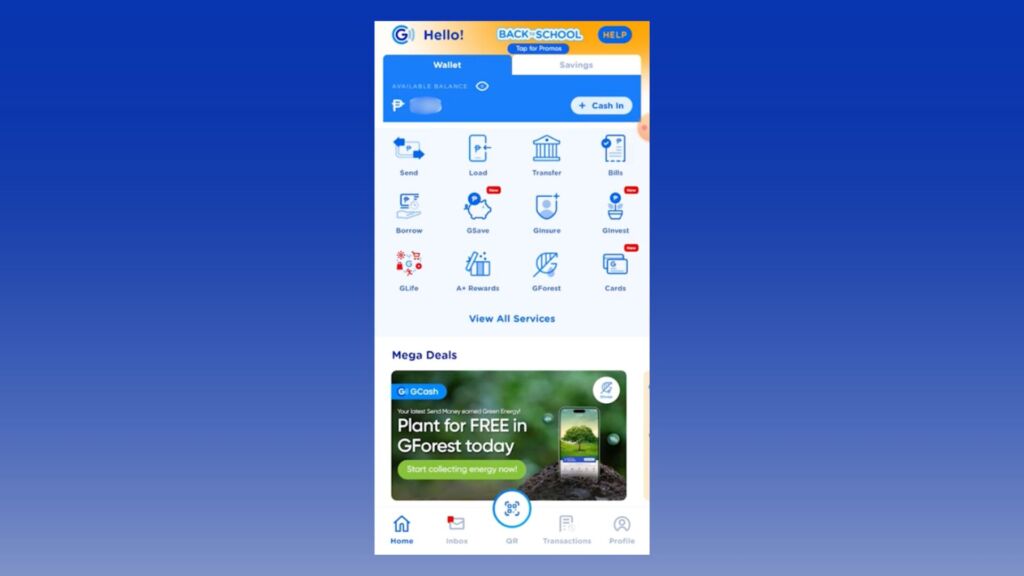
First, open the GCash app on your smartphone screen.
If you haven’t downloaded the app yet, it’s available for iOS or Android, so please get it.
Later, you’ll check if the transfer completed within the Maya app. Having the Maya app ready beforehand makes things smoother.
2. Tap Transfer
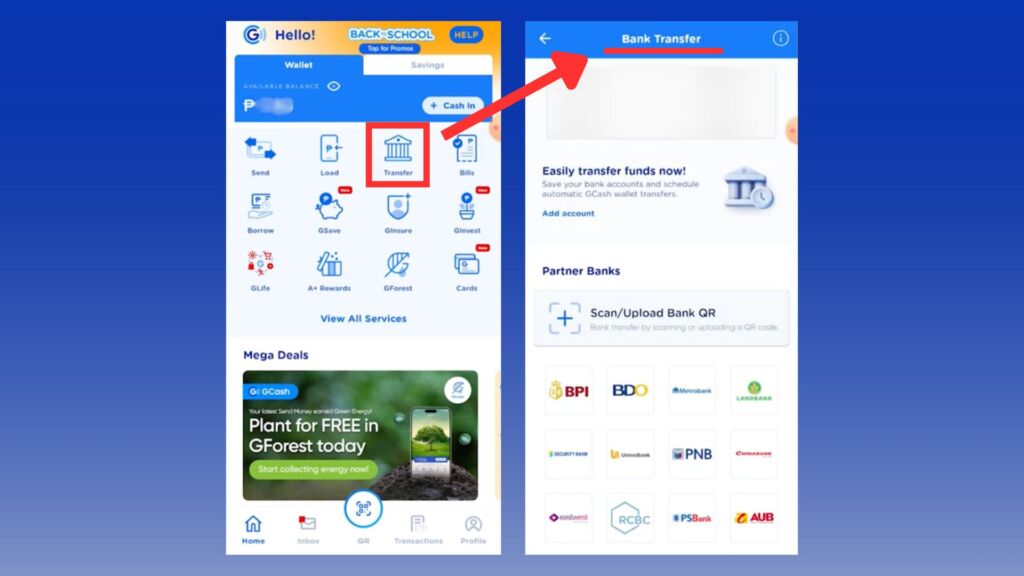
Tap “Transfer”.
This will display the Bank Transfer screen.
3. Tap “⋯ (View All)”
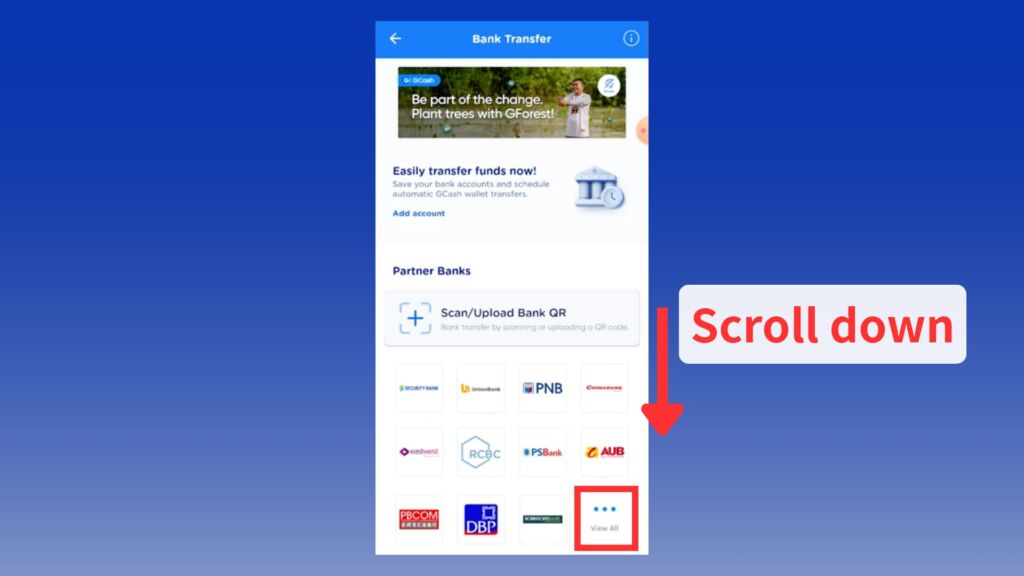
The Maya account you want to transfer to won’t appear on this screen.
Scroll down the Bank Transfer screen and click “⋯ (View All)”.
4. Search for “Maya” and tap “Maya Philippines, Inc./Maya Wallet”

Clicking “⋯ (View All)” displays a list of banks and other transfer options. You’ll see a screen like this.
The list is sorted alphabetically. Look for “M” or search for Maya in the search bar.
Tap “Maya Philippines, Inc./Maya Wallet” from the options.
5. Enter the required information and tap “Send Money”
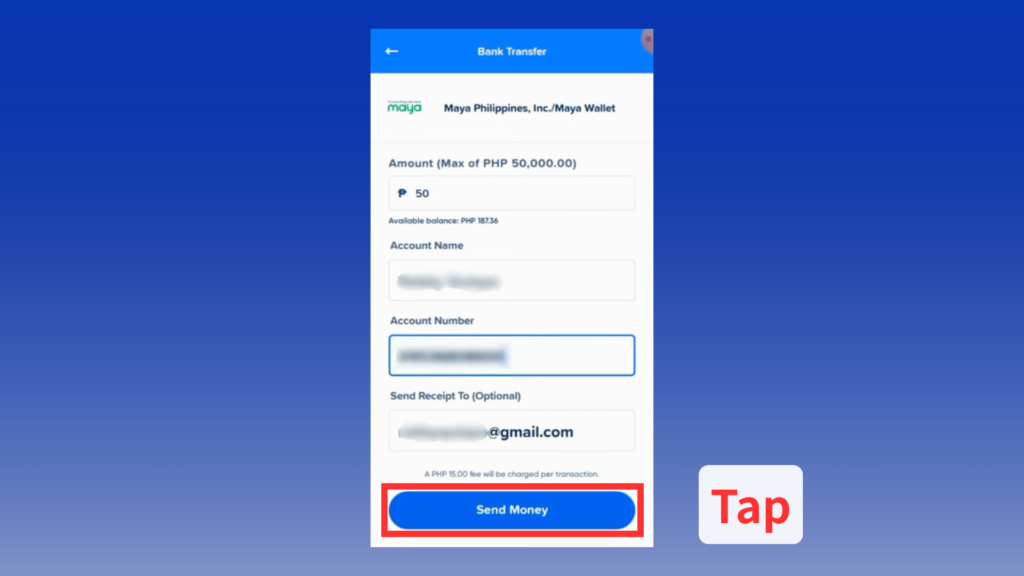
On the screen below, enter the following required information:
- Amount
- Account Name
- Account Number
- Send Receipt To (Optional)
Enter the amount you wish to send, along with the account name or mobile number you use with Maya.
The maximum amount you can send per transaction is ₱50,000. A ₱15 fee applies per transaction.
Before tapping “Send Money,” double-check the information you entered to ensure you are not sending to the wrong account.
6. Review the details and tap “Pay PHP”
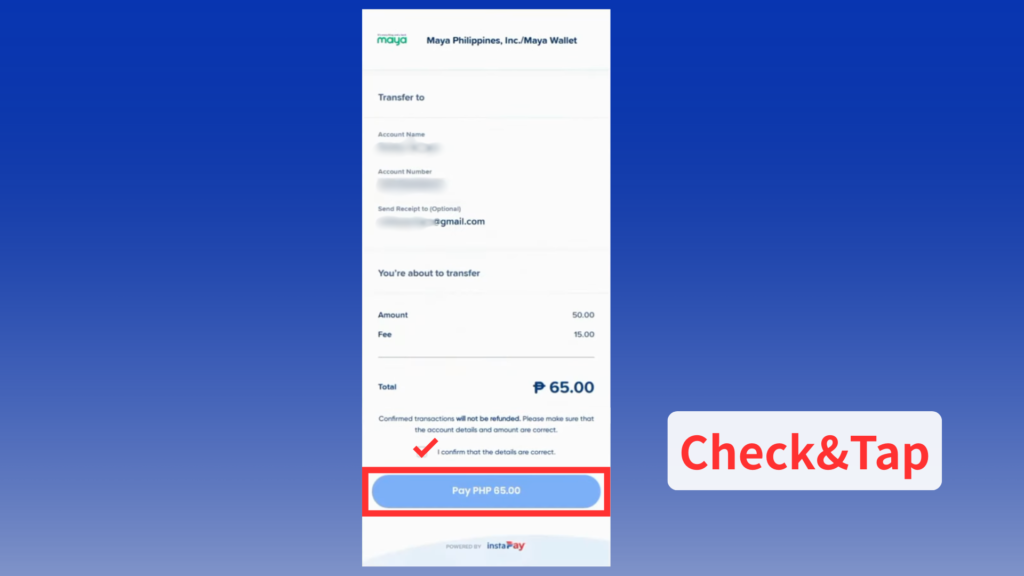
A screen will appear to confirm the details you entered. Double-check that everything you entered is correct.
Also, remember to confirm that a ₱15 fee applies per transaction.
Finally, confirm the account details and amount are correct, check the box, and tap “Pay PHP”.
7. Enter the 6-digit verification code and tap “SUBMIT”
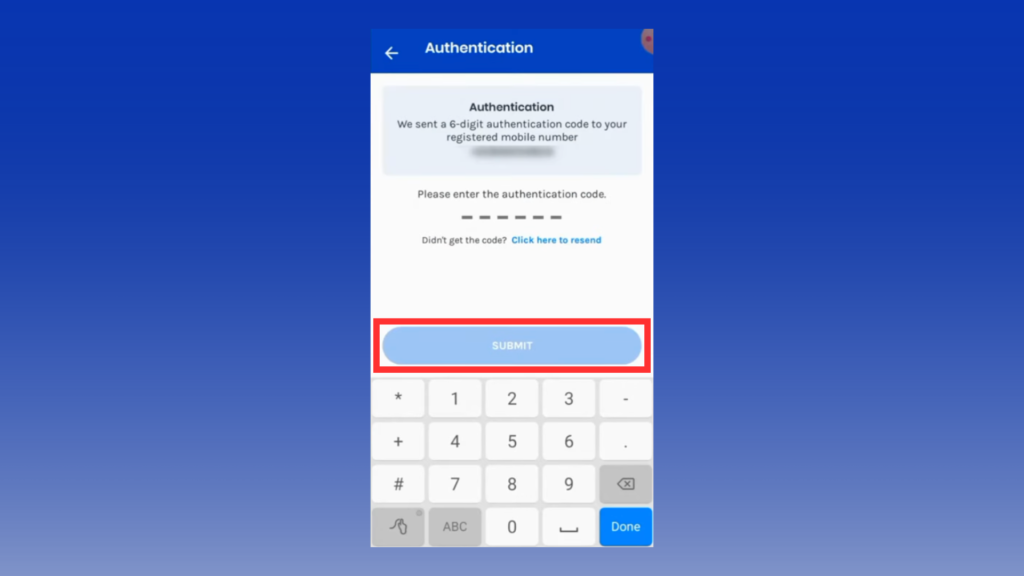
Check the 6-digit code sent to your mobile number and enter it.
After entering, tap “SUBMIT”.
8. Transfer Complete
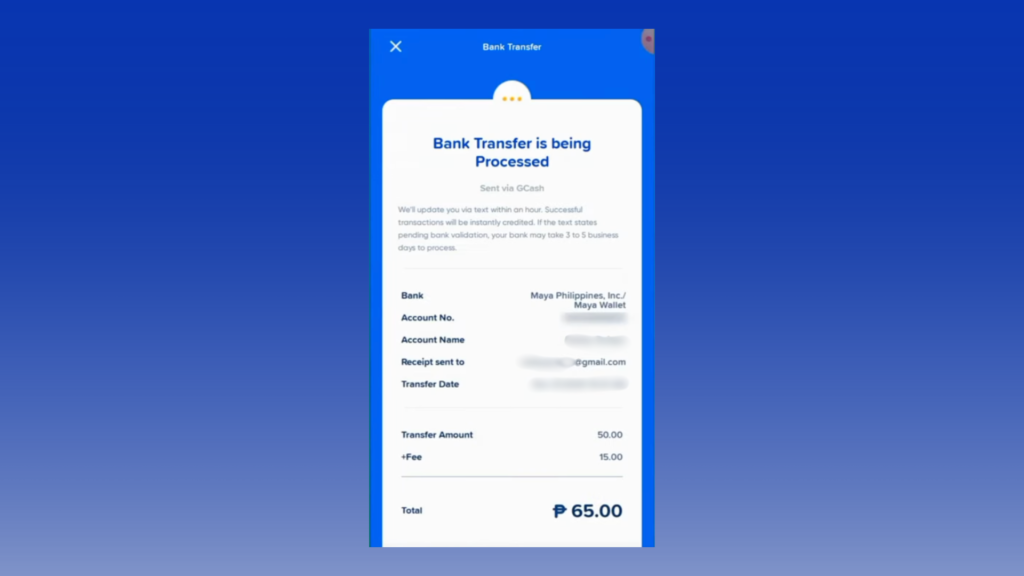
When the screen above appears, your GCash to Maya transfer has completed successfully.
For peace of mind, open the Maya app to confirm the transfer was successful.
While it may take a few minutes to reflect, it typically updates in real-time.
If you want to learn more about online casinos that accept Maya, check out the article below.
GCash to Maya – 3 Key Points for Smooth Transfers
GCash to Maya isn’t overly complicated.
Here are three key points to ensure a smooth transfer:
- Verify Your Account
- Enter the recipient’s information correctly
- Ensure you have sufficient funds available
Verify Your Account
Be sure to complete identity verification for both your GCash and Maya accounts.
You can only send money to Maya (bank transfer) using accounts that have undergone identity verification.
Verifying your account information provides the following benefits:
| Approval | None(Basic) | Yes(Fully Verified) |
| Transfers | ✕ | ◯ |
| Cash-in | ◯ | ◯ |
| Usage Limit | ₱10,000 | ₱100,000 |
| Security | Standard | Enhanced |
Additionally, you can increase your limit up to ₱500,000, but this requires approval from GCash. Keep the following conditions in mind:
- Be 18 years or older
- Have conducted transactions before
- Be in an active status
- Have an approved account
To send money easily without worrying about limits, it’s best to verify your account.
Enter the recipient’s information correctly
When transferring from GCash to Maya, you need to enter details like the account name and phone number.
After entering, always double-check the recipient information on the confirmation screen.
Checking numbers and names carefully helps avoid transfer mistakes.
If you accidentally send money to the wrong recipient, contact the support team. If sent to another number, you can contact the recipient and request a refund.
You’ll need the payment details, so it’s best to keep a record.
If you attempt to send money to a deactivated account, an error message will appear.
Ensure you have sufficient funds available
Transfers from GCash to PayMaya range from a minimum of ₱1 to a maximum of ₱100,000 per transaction.
By verifying your account, you can increase the limit from ₱5,000 to ₱10,000.
While there are no restrictions beyond the amount, a ₱15 fee applies per transfer.
If you send money often, keep enough balance in your GCash.
Send money anytime, stress-free, at your convenience.
Want to know the top online casinos in the Philippines? Check out the article below.

Frequently asked questions about transferring GCash to Paymaya
This section covers frequently asked questions about transferring gcash to Maya.
How quickly can GCash send to PayMaya?
Transfers from GCash to PayMaya typically complete within 1-5 minutes.
If you’re unsure if the transfer completed, open the PayMaya app to check.
How much is the fee?
The fee is 15 pesos per transfer.
Splitting the transfer into multiple transactions will incur multiple fees, so be careful.
To avoid extra fees, check the amount before sending money from GCash to PayMaya.
Are there any procedures I should complete before transferring?
Account verification is required before transferring. Unverified accounts can pay bills and utilities, but cannot send money.
The verification process is relatively simple and requires the following steps:
- Enter the verification code sent to your mobile phone number
- Enter your date of birth
- Confirm your Philippine nationality
- Select a government-issued ID
- Take a selfie
Minors may need extra information, like a birth certificate.
Account verification typically takes about 3 days.If it takes longer, contact the support center.
Is there a transfer limit?
Transfer limits are set daily or monthly. The maximum transfer amount varies based on your account status.
Specifically, remember it changes based on the following condition: Verification level, Age
,Membership registration (paid)
The maximum transfer amount from your wallet ranges from ₱10,000 to ₱500,000 per day. If you have monthly or daily settings, refer to those limits. Limits reset on the 1st of each month. For more details, please refer to the official website.
The specific conditions and transfer limits are as follows:
| Basic | GCash Junior | Fully Verified | GCash Plus | GCash Platinum | |
| Overview | New or unverified GCash users | For users aged 7 to 17 | For fully verified GCash users | Fully verified users with linked bank or investment accounts | For eligible Globe Platinum members |
| Daily Transfer Limit | None | ₱10,000 | ₱100,000 | ₱500,000 | ₱1,000,000 |
| Monthly Transfer Limit | ₱5000 | ₱10,000 | None | None | ₱1,000,000 |
Comparing GCash and Maya – Which is Easier to Use in the Philippines?
GCash and Maya are popular payment methods in the Philippines.
Both services allow for easy online payments and money transfers.
We’ll explain how easy they are to use and how people use them in the Philippines.
GCash – Widely Used as a Payment Method
GCash is the most widely used mobile wallet in the Philippines. With just your smartphone, you can send money, make QR code payments, pay bills, and transfer funds to banks.
Used by thousands of users, it’s also widely accepted as a QR code payment method at retail stores, street stalls, and shops in Metro Manila and other major metropolitan areas.
This makes everyday shopping and money transfers easy, giving it an overwhelming advantage in usability.
Recently, it has enabled payments and transfers in US dollars using virtual accounts, focusing on enhancing the convenience of international remittances.
While highly convenient, some users report the app being slow and difficult to use. There may also be extra costs or limits on how some features work.
Maya – Also Capable of Asset Management
Maya is a rapidly growing digital wallet in the Philippines. Its services are characterized by a focus on convenience and innovation.
While its market share is lower than GCash, it is the second-largest service domestically. It tends to be particularly popular among younger users and those in urban areas.
Maya offers more than just electronic payments; it also includes digital banking features, making it a recommended service for those wanting to manage a wide range of assets.
Its appeal is that it has more features than a typical payment app.
Compared to GCash, fewer shops accept it, so some services may not work with Maya.
Because it has many features, you need time to learn how to use it well. Some users may feel confused at first.
Make Online Casino Payments Easy with GCash to PayMaya
Quick and reliable fund transfers are key to enjoying online casinos. In the Philippines, moving money from GCash to PayMaya is a convenient and widely used option.
By following our step-by-step guide and taking simple precautions, you can transfer funds smoothly and securely. This method ensures your deposits and withdrawals are fast, stress-free, and ready for gaming.
Plus, you can claim a ₱100 GCash bonus! Complete the required steps, receive the bonus in GCash, and transfer it to PayMaya for use in your favorite online casinos.
UPDATE HISTORY
・02.04.2026: Updated bonus information

Publish date: 02.04.2026
Update date: 02.04.2026
Tags:
Related Posts
- Online Casino Payment Methods in the Philippines: GCash, Maya, Crypto, PayPal & More

- Is MW Cash Legit in the Philippines? A Review with App & Bonus Info

- Playtime Online Casino Maya Guide: How to Deposit and Withdraw Safely in the Philippines
- Check Casino Plus Voucher Code Today 2026 Philippines – Legit PAGCOR Casino Review with FAQ, Scam Guide and App Info